Tuesday, February 26, 2019
Panoramic Image
For this assignment, I took 6 individual photos that I took outside and tried to make it look like a panoramic photo. First, I went outside and took photos and made it so that the edge of the photo matched up with the next. Then I downloaded them and dragged them into Photoshop to put them together.
Retouching Assignment
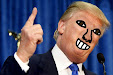
For this assignment, I know it looks very, very bad but I tried my best to get rid of this man's wrinkles. I got this image from the internet and downloaded it. I put it into Photoshop and used the spot healing tool.
Magazine Cover Assignment
For this assignment, I went to the internet and downloaded a magazine with Stephen Curry on it. Then I took a picture of myself in Photo Booth and cut it out. Then I put it over his face.
Monday, February 25, 2019
Movie Poster Assignment
For this assignment, I used a funny photo me and my brother took while messing around. I used a filter that enlarged my mouth because I thought it looked funny. For the poster, I used the poster from the 2018 Rampage movie. It had the humungous gorilla named George that I put my face over and it looks pretty funny.
Photo Collage with Text Features
For this assignment, I made random faces in Photo Booth and dragged them into Photoshop. Then I put many random sentences on the different photos.
Friday, February 22, 2019
Classical "Painted" Portrait
For this assignment, I used a picture of me that my brother took of me when we went on a hike to the Hollywood Sign. I used different filters to make it look like it was painted instead of an actual picture.
Creative Blurring
For this assignment, I used a radial blur tool and used the smudge tool to make some extra blur to it. I used a picture of Homer strangling Bart because I thought it looked pretty funny.
Subscribe to:
Posts (Atom)


